For the crew who build the rig — theatre, live events & broadcast
Build the show before the kit arrives.
One project. From planning to show day.
Plan your whole technical setup in one place. Draw the video signal flow, build the equipment racks, prepare the looms and print the paperwork your crew needs. Racks, panels, looms and kit lists take audio and video kit. Schematics are video only for now. Audio schematics are coming soon.
The beta is free: a key for a month on up to two computers, with the downloads.
Everything comes from the same project.
The devices, connections, drawings and paperwork are one file. Change a label and the schematic, the rack, the kit list and the crew’s page all change with it.
Design
Draw the video system
Every device arrives with its actual connections, so a cable cannot go into an input the unit has not got. Names travel with the signal through Patch Sync.
Schematics and Patch SyncBuild
Build the racks and the paperwork
Racks front and rear from real units, with power and weight added up. Custom panels, P-touch labels, looms and kit lists come from the same file.
Rack designOperate
Control supported kit
Route a Videohub and drive an ATEM from the drawing you made. Recorders and AJA KUMO are in beta. Everything else is documented and drawn.
What is controlledSee it working
Recorded from the app.
Screen recordings of PatchHub, using a demo show.
Design a video system
Drag kit onto the canvas, draw cables port to port, and trace a signal through the rig.
Build a rack
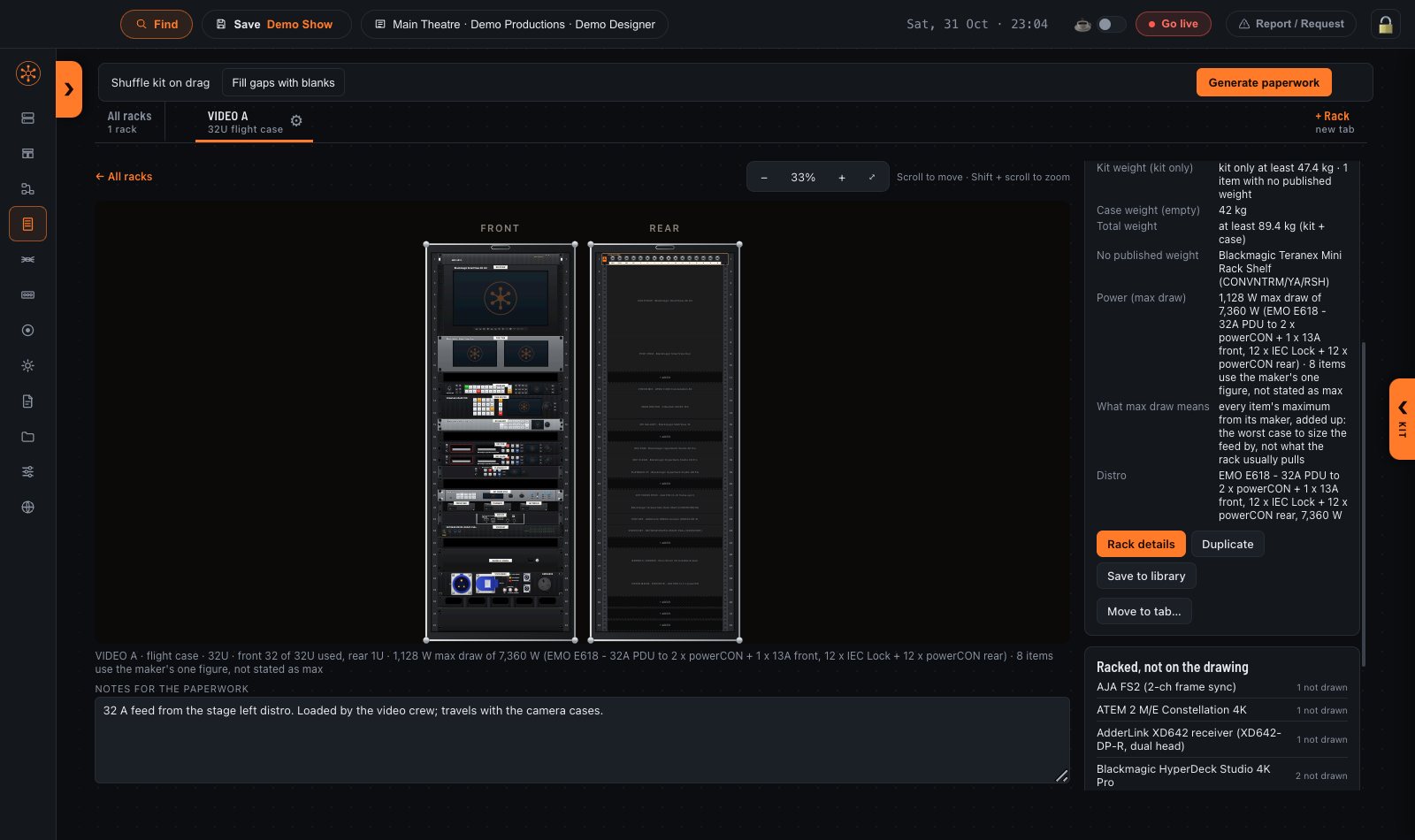
Drag kit from the drawer and it snaps into a 32U case at its real height, front and rear.
Prepare the show
Generate the show’s paperwork and look through the exported pages.
Control hardware
Videohub and ATEM are driven on real hardware: routing, labels and output locks on a Videohub, program and preview, keyers, transitions and multiviewer layout on an ATEM. HyperDeck, AJA Ki Pro and KUMO are beta. What is controlled.
Rack design
Draw the rack before you build it.
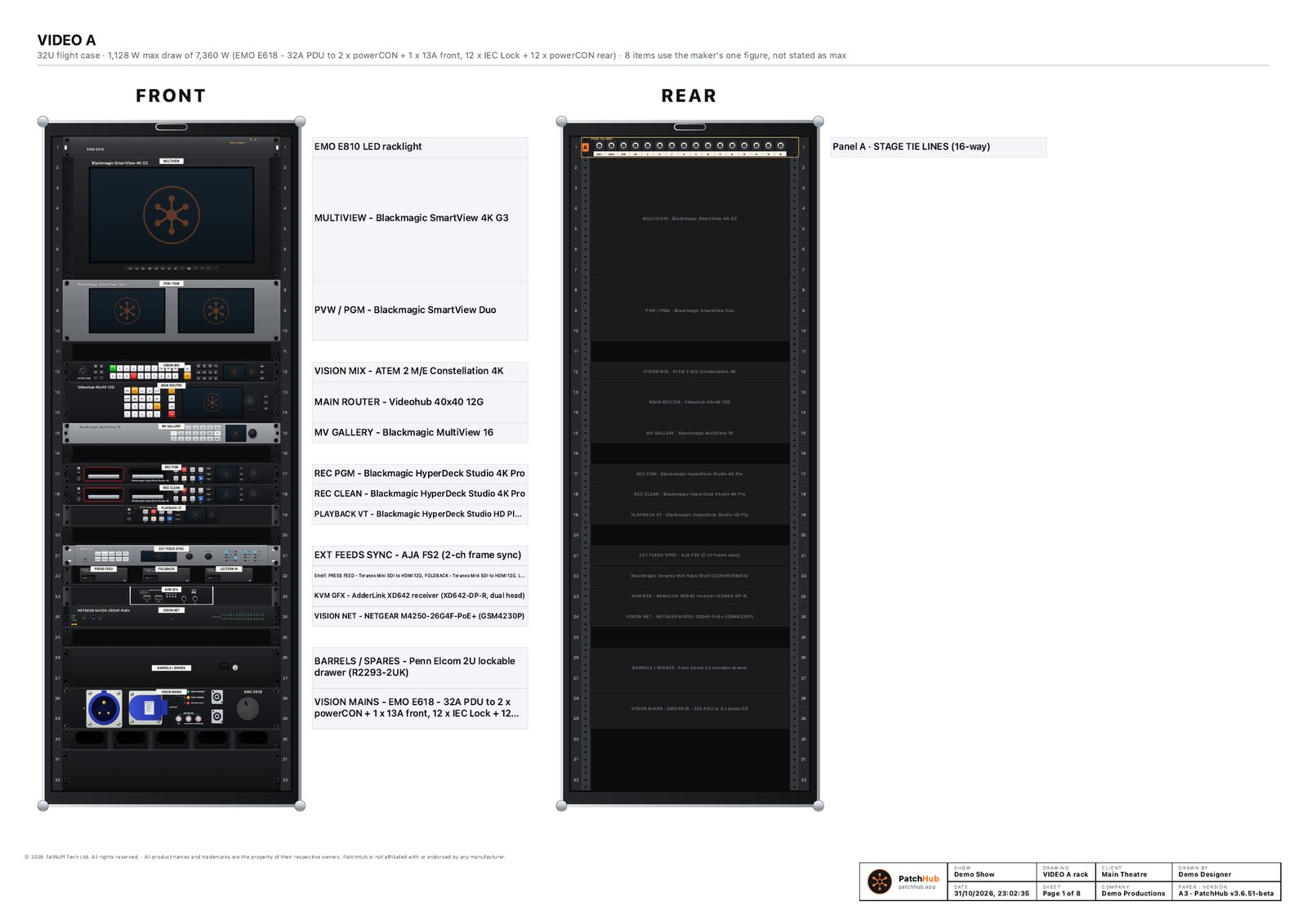
Racks are drawn from real units, front and rear, from a 1U drawer to a 48U install rack. Each rack adds up its own power and weight and prints a drawing you can build from.
- Real units
- Most of the kit, video and sound, is drawn as the real front of the unit. There are over 900 pieces of sound kit: amplifiers, processors, I/O frames, radio mic receivers, comms and recorders.
- Positioned by rack unit
- Rail holes sit at the real EIA positions and each unit is drawn with its rack ears, so what fits on screen fits in the case.
- Cases and racks
- Wooden sleeves, flight cases, double-wide cases and install racks, 1U to 48U, side by side if the show needs it.
- Front and rear
- Both are drawn together, so the rear shows where every connector and mains panel lands.
- Mounting and hardware
- VESA screens, keyboard trays, Mac and NUC enclosures, distros and UPSs go in like any other unit. Fibre trays (opticalCON and NZP1RU-8) and an audio frame builder with a stagebox patch work the same way.
- Power
- Each rack adds up its worst-case power draw. Amplifiers show the current at 230 V beside the watts.
- Weight
- The rack adds up its weight too, so you know what you are lifting before load-in.
- Custom panels
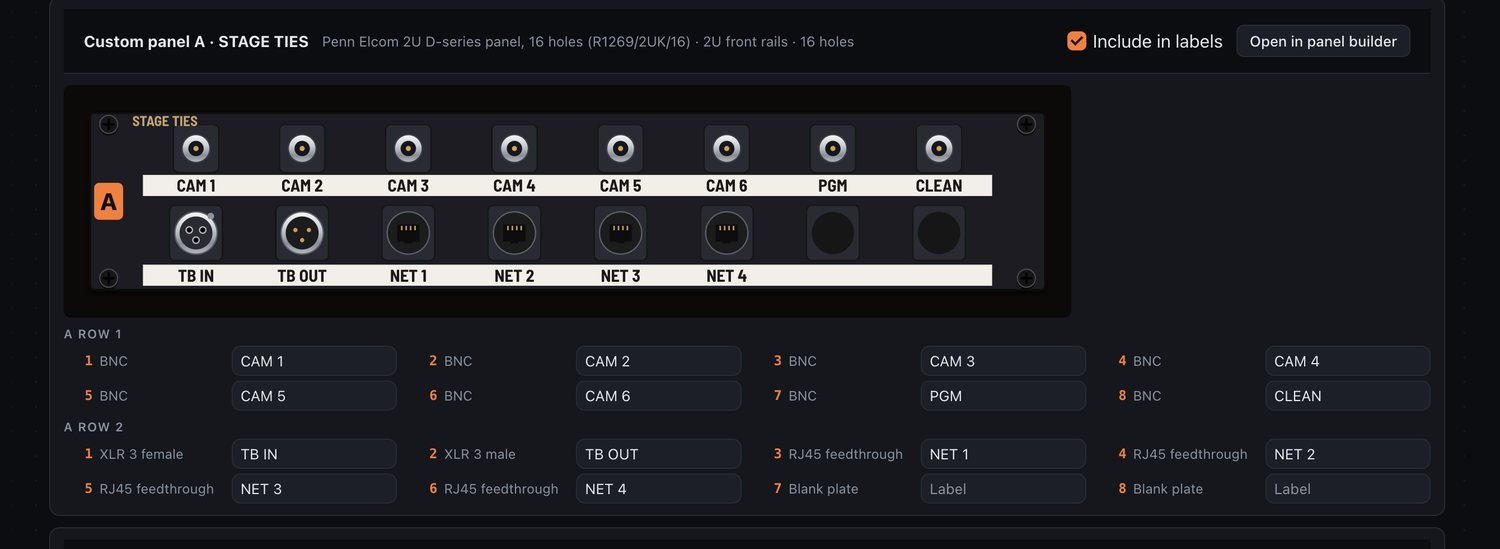
- D-series and BNC panels built a hole at a time, each with its own connector and label.
- Linked to the schematic
- Drag a whole rack onto the schematic and the two stay linked by name and IP address.
- Output
- An A3 sheet, a PDF per rack or per panel, or a 300 dpi JPEG. A QR code opens a rack on a phone.
Schematics and Patch Sync
Every device comes with its actual connections.
Drag a device onto the canvas and its real ports come with it. Draw cables port to port, with lines kept apart so each one can be traced by eye. Auto-arrange lays the rig out to fit the paper. Schematics are video only for now. Audio schematics are coming soon.
- Cables coloured by type, fibre cores included, with the key on every sheet
- Zones, text and lines from one toolbar (V, Z, T, L)
- Multicores drawn with both ends placed
- Switches with the LAN and SFP modules in each cage, an IP list, a clash warning and a live light on each socket
- A video signal plan page and a title block with show, client, company and drawn by
- The whole schematic as one high-resolution JPEG
- Control panels, KVM, wireless video, Datapath and Magewell in the category strip
- ⌘K search and a signal trace report
Name it once, at the camera.
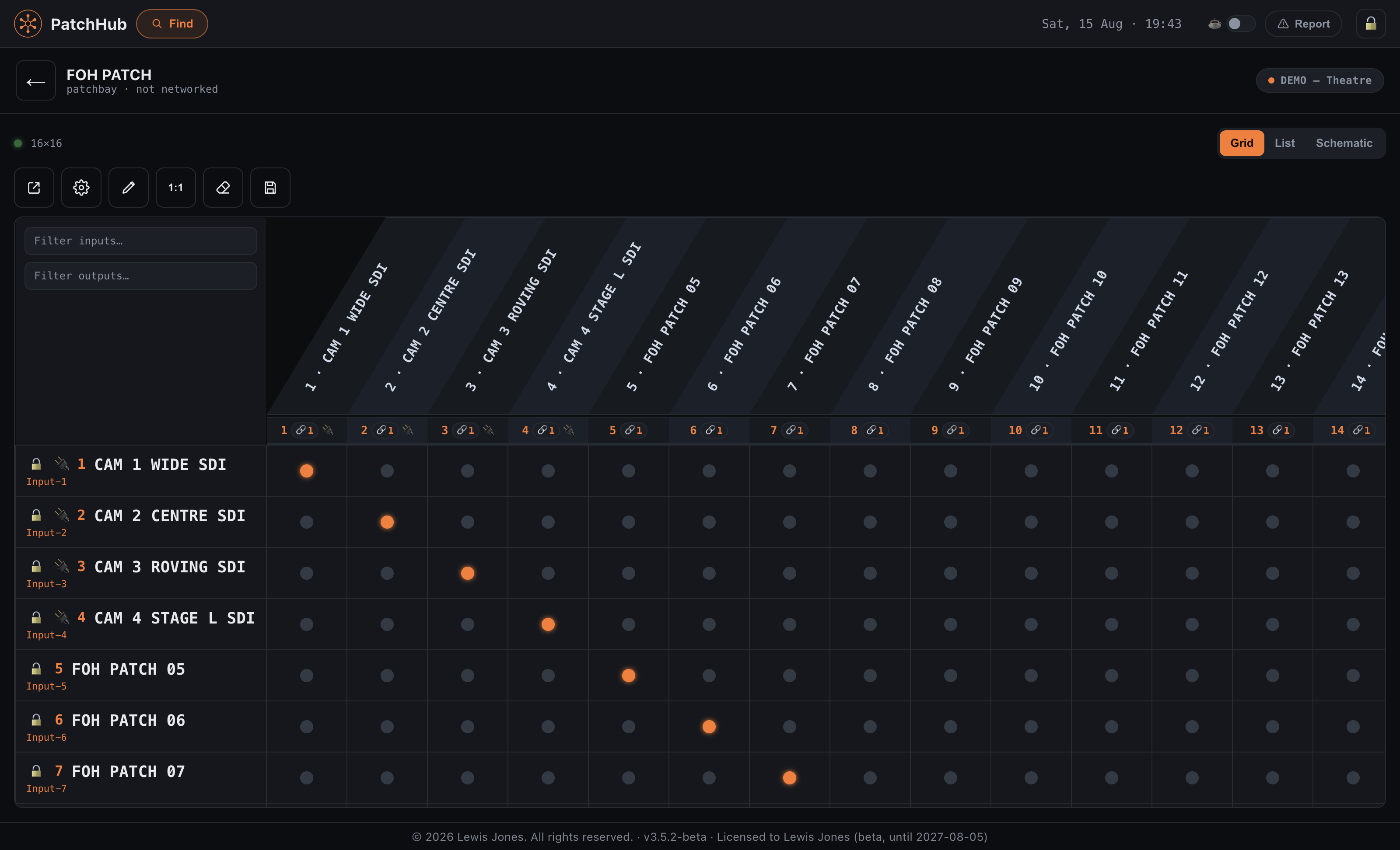
Type a name on the source and it travels with the signal through every Videohub, ATEM, patchbay and converter it passes. Rename it and the whole chain follows, including the printed sheet and the crew’s page.
Kit lists, panels and looms
The paperwork a crew can follow at four in the morning.
All of it comes out of the same file as the schematic, so it cannot drift from the drawing. Watch the paperwork being generated
Kit list
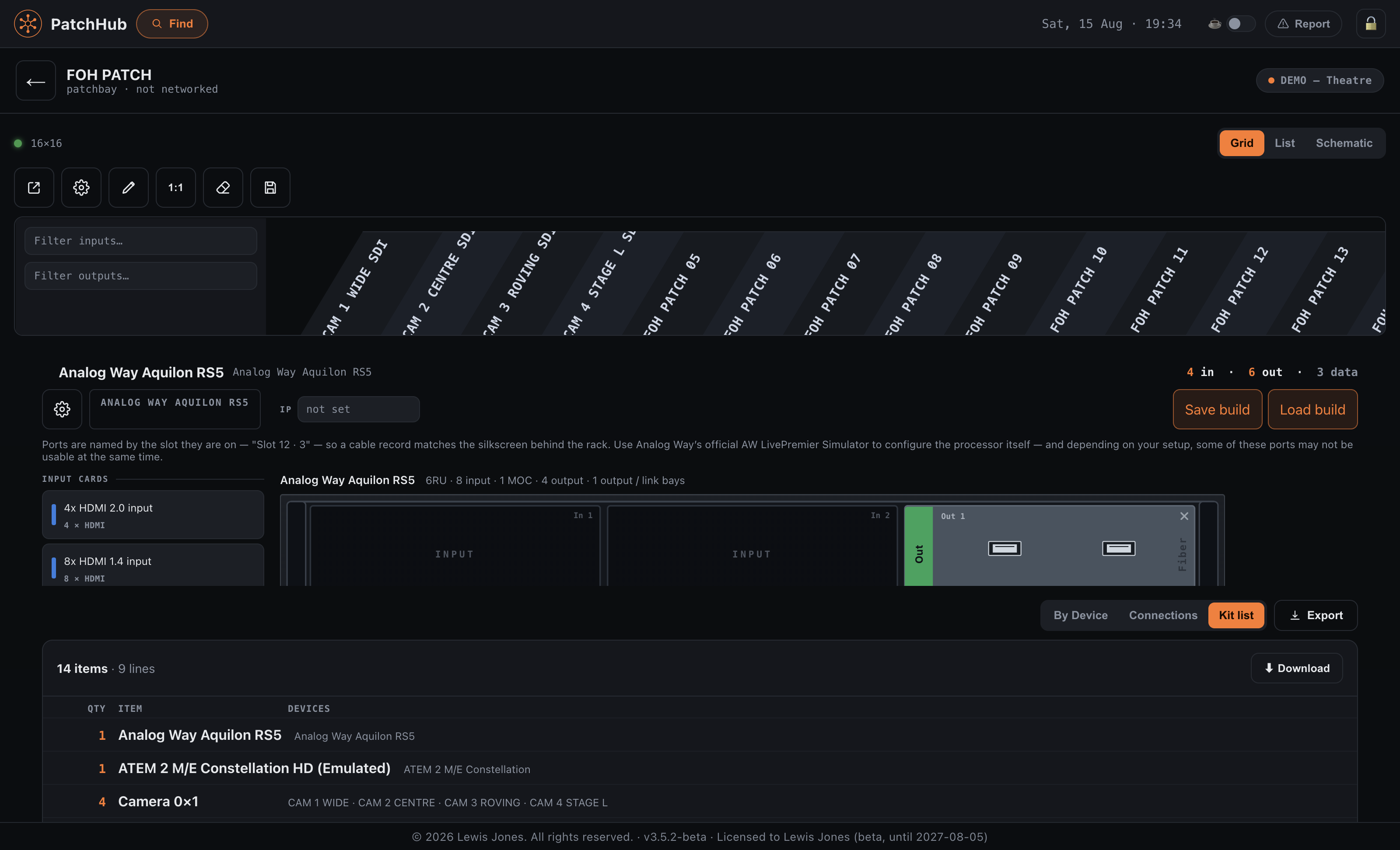
Built from the rig, not kept in a spreadsheet beside it. It counts every lead by type with a cables total, lists the adapter each end of a display cable needs, and runs A to Z if you want it. Out as PDF, Excel and CSV.
Custom panels
Build D-series and BNC panels a hole at a time, lettered A, B, C across the whole show so two racks never fight over a letter. Export writes P-touch CSVs, one file per panel size. Strips are made for amps, blanks and loom cable ends too.
Looms
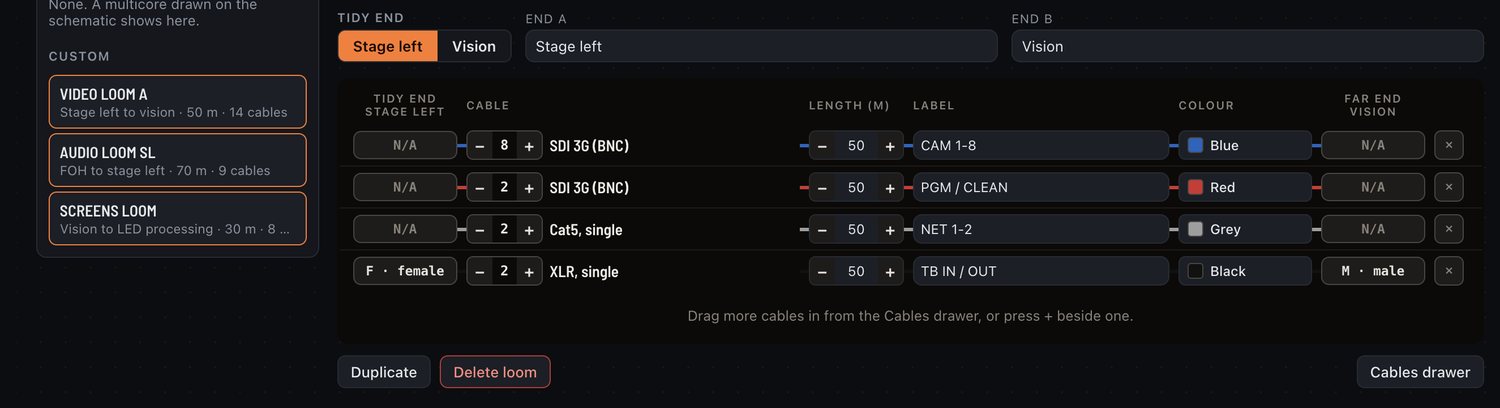
A loom drawn on the schematic is the same loom on the Looms page. Give each one a location, a length, a colour and its cables with their tidy ends and labels. Looms with cables in them appear in the kit list, so what you prep and what you hire come from one place.
Amps and Public View
Amplifiers carry their own paperwork: a label, a network note, an amp number and an Amp ID, with a name and an input per channel. It prints as an amp channel table per rack and a master list across the show.
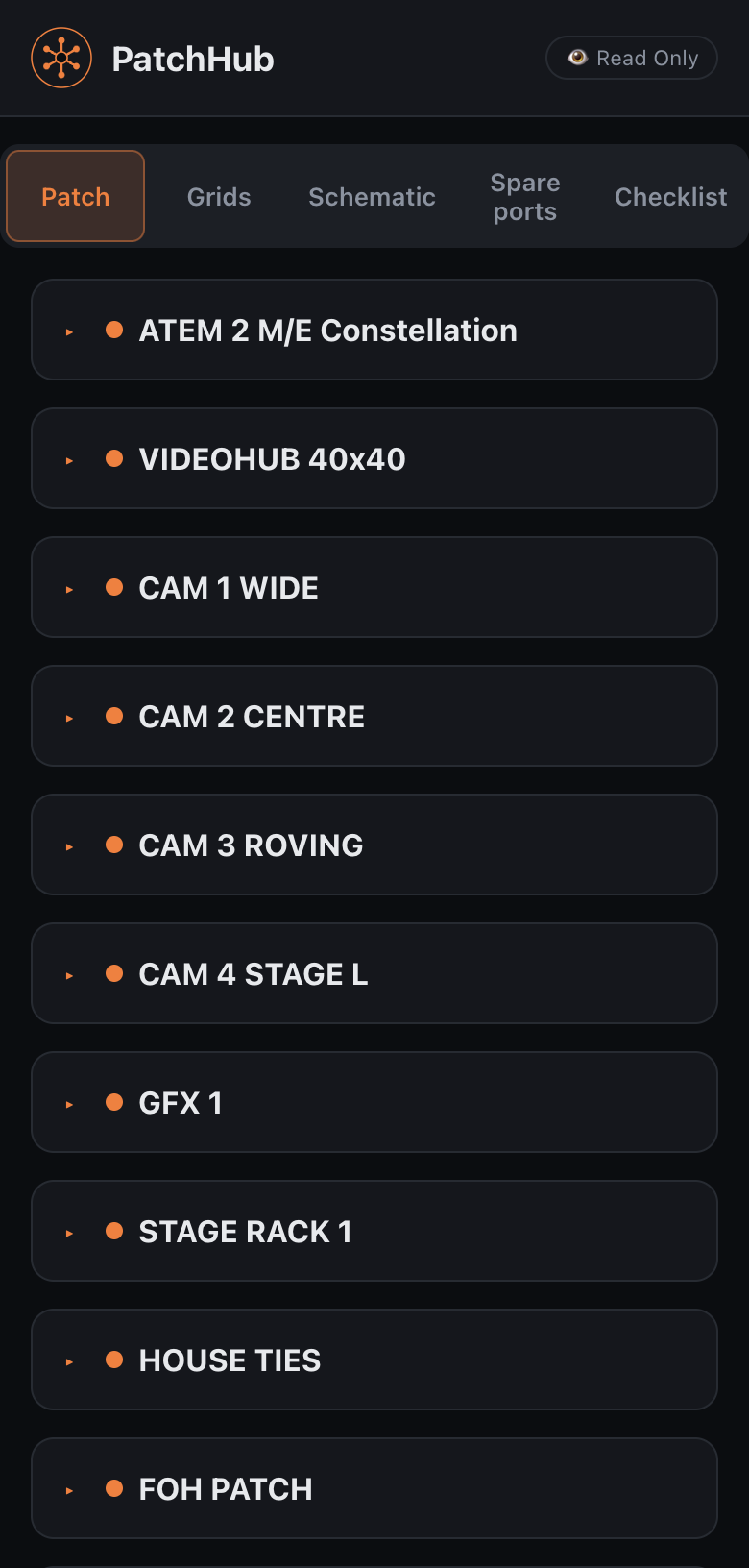
Public View is a read-only page for the crew. They do not need PatchHub installed. It has tabs for the patch grids, spare ports and a tickable checklist. Sharing it over the internet from Windows is beta.
Audio and video
Both go in the same rack. Only video is drawn as signal flow.
PatchHub documents audio and video kit side by side. A d&b amp and a Videohub share a rack, a kit list and a loom. Audio schematics are coming soon.
| Audio | Video | |
|---|---|---|
| Equipment documented | Yes | Yes |
| Racks, front and rear | Yes | Yes |
| Panels, looms and labels | Yes | Yes |
| Kit lists | Yes | Yes |
| Signal-flow schematic | Coming soon | Yes |
| Live control | No | Videohub and ATEM; beta for recorders and KUMO |

Hardware
What PatchHub controls, and what it only documents.
Two different things, kept apart: the kit PatchHub talks to over the network, and the much longer list it documents and draws.
Blackmagic Videohub and ATEM
Videohub: routing, labels and output locks, read from the router and sent back to it. ATEM: aux routing and a full switcher surface, with multiviewer layout, media pool stills and players, and the built-in ISO recording. These are the only two we have driven on physical devices.
Blackmagic HyperDeck, AJA Ki Pro and AJA KUMO
Transport, clips and disk space on the recorders; routing and labels on KUMO. The protocol is implemented and tested against a test server that speaks it. Nobody has yet pointed it at the physical device, so prove it on your own kit before a show depends on it.
Everything else in the catalogue
Over 1,300 models, with their video ports and data sockets, down to a passive panel with no network port at all. Projectors are documented kit; PatchHub does not control them.
Blackmagic 2110 IP converters
Lay out and patch a 2110 system and PatchHub will find the IPX converters on the network, but it cannot send routes to them. There is no Ross Video, Grass Valley or Riedel control.
Rehearse the rig with no hardware. Every controllable device can be emulated, so you can lay out and rehearse the whole rig before the kit lands. Go live (beta) then pushes the names, and the routing if you want it, to a real Videohub or ATEM after a confirm. HyperDeck, AJA Ki Pro and KUMO can be taken live too, but those are beta.
Device data is compiled from published specifications and can be wrong or out of date. Check the hardware in front of you before you trust a printed schedule.
- Videohub routers
- ATEM switchers
- Cameras
- Playback & graphics
- Capture cards
- Presentation switchers
- LED processors
- Projectors
- Recorders
- 2110 gateways
- DAs & converters
- Patchbays
Who it is for
Built for the person who gets handed the rig.
- Freelance engineers turn up with the patch already drawn and the labels already typed, instead of building it on a laptop in the truck.
- Video and audio departments get one way of documenting a rig, so the drawing from the last job is readable by whoever picks up the next one.
- Sound designers spec the amp racks, the comms and the radio mic receivers, and name every channel before the trucks load. Schematics are video only for now. Audio schematics are coming soon.
- Theatre and venue teams keep house ties, wall boxes and FOH runs documented between productions, instead of in one person’s head.
- Production and AV companies send the same file to the designer, the crew chief and the hire desk, and they all read the same rig.
About
Built by people who work in live production.
PatchHub is developed by TallNuff Tech Ltd and is in beta. What you can check for yourself:
- The screens and recordings on this page are from the app, and the recordings use a demo show. Nothing here is a mock-up.
- Hardware status is stated device by device. Two kinds of kit have been driven on real hardware, and the rest says so.
- The app updates itself, asks before it restarts, and takes a backup before every update.
- Questions and bug reports go to [email protected], or from the Report and Request buttons inside the app.
Pricing and beta access
Join the beta free. Subscriptions are coming.
The beta is the complete app. Subscriptions are sold through Polar and renew until cancelled. Buying is not open yet.
Join the beta and you get a key that lasts a month, on up to two computers. The downloads come with it.
- The complete app, nothing held back
- Real hardware or the built-in emulators
- Updates itself, and asks before it restarts
Already testing on a key that starts PHUB-? Carry on with it until it expires; there is nothing to do. Without a key you can start a seven-day trial: edit and save, but exports need a key, and it is limited to two devices online and one rack of up to 24U.
a month + local tax
£35 every 3 months + local tax · saves £10 on monthly
Prep for sound and video, drawn and documented in one application. One licence key works on one computer.
- Schematic, patch sheets and kit lists
- Rack drawings, front and rear
- Custom panels, with P-touch label files
- Loom lists and cable schedules
- Audio and video kit in the same rack
- Videohub and ATEM live; recording included (beta)
- Paperwork out as PDF, Excel and CSV
- Public View for the crew, on a phone
per seat a month + local tax
For teams: a minimum of five seats. Each person gets their own licence key, and the buyer assigns the seats to their team.
- Everything in PatchHub
- One key per person, one computer each
- Seats assigned and moved by the buyer
- Tax
- Prices exclude VAT or local sales tax, which Polar adds at checkout for your country.
- Renewal
- Subscriptions renew until cancelled. When a subscription ends, the key stops working.
- Seats
- Business seats are assigned in the buyer’s Polar account. Each seat holder gets their own licence key.
- Moving a key
- Each key works on one computer. To move it to a new one, release the old computer in your Polar account.
- Offline
- Activating a key needs the internet once. After that PatchHub checks the key with Polar when it is online, and a key that has been working keeps working when it is not.
- No key
- Without a valid key PatchHub opens read-only: everything already there opens, reads and prints on screen, and nothing is deleted.
Without PatchHub the same job is a drawing in one program, a kit list in a spreadsheet, labels typed again into a label printer, and a PDF somebody has to remember to update. Here they are one file, so the paperwork follows the drawing.
Questions
The things worth knowing first.
Can I build the rig before I have the hardware?
That is what it is for. Devices, cards, ports and cabling are all documented without anything plugged in, and the built-in emulators let you drive a Videohub or an ATEM that is still in a flight case. When the real kit arrives you point the same file at it.
Which hardware can PatchHub control?
Blackmagic Videohub routers and ATEM switchers, both driven on real hardware. In beta: Blackmagic HyperDeck and AJA Ki Pro and KUMO, each written to its published protocol and tested against a test server that speaks it, but not yet tried on the physical device. Everything else in the catalogue, projectors included, is documented and drawn rather than driven. Search every model.
Does PatchHub draw audio signal flow?
Not yet. Schematics are video only for now. Audio schematics are coming soon. Audio kit already goes in racks, panels, looms and kit lists like any other kit, and amplifiers have their own channel paperwork.
Does PatchHub work offline?
Yes. It runs entirely on your machine, with no cloud and nothing to sign in to inside the app. Activating a key needs the internet once; after that it checks the key with Polar when it is online and keeps working when it is not. The only things that need a network are the ones that obviously do: talking to your hardware, and sharing the crew’s read-only page.
Does it run on macOS and Windows?
macOS is the version in daily use through the beta, and it is notarised by Apple, so it opens with no warning. The Windows build is beta: it is newer, it has had far less time on real shows, and the installer is not yet code-signed, so Windows SmartScreen warns the first time you install it. That warning means the publisher is unverified rather than the file being known to be bad. If you are on Windows, try it on a machine that is not running a show first. Sharing Public View over the internet from Windows is also beta.
Does PatchHub count my cables?
Yes. Every cable you draw is a real record, port to port, and the kit list counts every lead by type, with a cables total, in the PDF, Excel and CSV. Display cables list the adapter each end needs. The cable schedule still gives you the individual runs.
What is in the seven-day trial?
For seven days the trial lets you build and save a rig. Exporting needs a key, and the trial is limited to two devices online and one rack of up to 24U. When it ends the app goes read-only again; nothing is deleted, and your show files are yours either way.
How much is it?
PatchHub is £15 a month + local tax, or £35 every three months + local tax. PatchHub Business is £12 per seat a month + local tax, with a minimum of five seats. Buying is not open yet; the beta is free to join. Pricing and terms.
Build the rig before the kit arrives.
The beta is free: a key for a month on up to two computers, and the downloads come with it.